Zombie Pet AI Video Template: Your Pet Comes Back to You
A photo of your pet, a photo of you, and a fifteen-second story that ends in a hug.
Updated
Select template
Settings
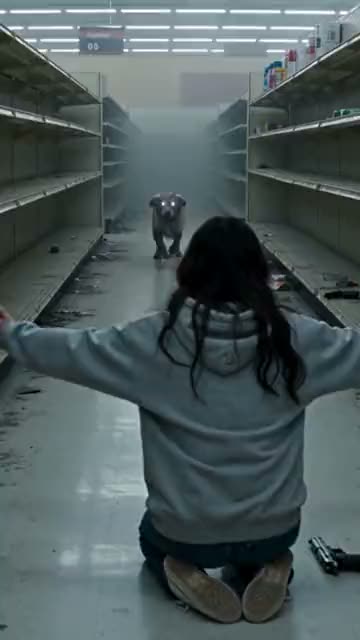 Zombie Pet15s · 100 credits · Seedance 2.5 · 480p
Made with this template
What is the Zombie Pet AI video template?
The Zombie Pet AI video template opens on you in tears in an abandoned supermarket, holding a weapon, while your pet stands at the end of the aisle, changed: glowing eyes, ragged fur, a low snarl. Then you spot its name tag. You put the weapon down, kneel and open your arms.
Your dog or cat charges down the aisle and leaps, and in mid-air the film cuts to a sunny meadow where it lands in your arms and licks your face. It is the pet version of a love story, and people share it with the friend who would do the same.
Where the Zombie Pet trend comes from
The template recreates the Zombie Pet trend, the animal version of the turned-loved-one story that spread on TikTok and Instagram in autumn 2026. In the clips people share, a dog or cat has turned, milky-eyed and strange, and comes slowly out of the dark. A collar tag or a bell gives it away, the owner’s arms open, the animal leaps, and a hard cut jumps to a sunny memory of the two of them. Dogs started it, and the dog-finds-its-owner version is still the most searched; cats followed, then two-pet versions. Captions like “my dog came back, wait for the ending” are typical, and many people make it for a dog or cat who has died. An animal cannot say your name, so the recognition has to come from something small, and the cut to the bright memory feels like getting them back for a second. Comments under the best ones read: “why am I crying, it is just AI.” The Zombie Pet AI video template keeps the standoff, the transformation and the reunion, with your own pet and you.
Why the Zombie Pet trend works
The Zombie Pet AI video template works because pet owners recognise the feeling instantly: you would open your arms to your dog or cat whatever happened to it. The eerie first half sets up the fear, and the sprint into your arms pays it off. It is the pet version of the love story twist, which is why people share it with other dog and cat owners and tag the friend who would do exactly the same.
Key features of the Zombie Pet AI video template
- No prompt: the Zombie Pet scene, camera and timing are set.
- Zombie Pet videos run 15 seconds, like the original.
- A vertical 9:16 or wide 16:9 Zombie Pet video with sound.
- No visible watermark on your Zombie Pet video.
Ideas for your Zombie Pet video
- Post your Zombie Pet video on your pet’s birthday or adoption day.
- Make a version with each pet in the house and post them together.
- Tag the friend who would never let their dog go either.
Best photos for the Zombie Pet AI video template
The Zombie Pet template asks for 2 photos: your pet (transforms, then runs to you) and you (waits with open arms).
- Photo 1 is your pet, photo 2 is you.
- Pet photo: the whole animal, sharp, in good light.
- Your photo: front-facing, waist-up or full-body.
- Pick 9:16 for TikTok and Reels or 16:9 for YouTube.
Zombie Pet AI video template vs filming it yourself
| Zombie Pet template | Filming it yourself | |
|---|---|---|
| You need | Two photos | A camera, a location and a helper |
| Time | A few minutes | Hours of filming and editing |
| Timing | Matches the Zombie Pet trend | Depends on your takes |
| If it fails | Credits back | Film it again |
How much the Zombie Pet AI video template costs
One Zombie Pet video costs 100 credits before you generate. Credit packs start at $9.90 for 100 credits and never expire, with no subscription; see pricing.
How to make your Zombie Pet video
Check the Zombie Pet template
The Zombie Pet AI video template is already selected in the generator above, at 100 credits per video.
Upload both photos
Use clear photos of yourself, of adults who agreed to be in your Zombie Pet video, or of your pet where the template allows it.
Generate and post
Press Generate and download your Zombie Pet video when it is ready, usually in a few minutes. Add the Zombie Pet trend’s sound when you post.
Posting tips for your Zombie Pet video
Post while it trends
Post your Zombie Pet video while people still search for it.
Use the trend’s sound
The app then shows your Zombie Pet video next to the others.
Tag who you made it with
A Zombie Pet video travels further when they share it too.
Label it as AI
Turn on the AI label for your Zombie Pet video.
More like this
- Trending15s
Zombie Love Story
2 photos100 credits
- You
- 2 people
- Trending15s
Bulin 47
1 photo100 credits
- You
- Pet
- New9s
BbY WOW Guy
1 photo80 credits
- You
 15s
15sBurning Bridges
1 photo100 credits
- You
Frequently asked questions
Is the Zombie Pet AI video template free?
No. Each Zombie Pet video costs 100 credits before you generate, and a failed Zombie Pet video gives its credits back.
Can I use a photo of a pet that has passed away?
Yes, if the animal was yours. Many people make the Zombie Pet video as a tribute; the ending is warm rather than sad.
Which pets work with the Zombie Pet template?
Dogs and cats work best. Other pets may work if the photo shows the whole animal clearly.
Is it too dark for kids to watch?
The Zombie Pet video is moody but not gory: no blood and no shot is fired, and it ends warmly. Still, a weapon is held in the first half and the transformation can be spooky; watch it first.
Will my dog or cat still look like itself?
Yes. The Zombie Pet template keeps the species, breed, fur, markings and collar from your photo, so the reunion feels like yours.
Can I make it with a cat?
Yes. Dogs started the trend, but the Zombie Pet template works the same way with cats: use one clear photo of your cat, facing the camera.
Can I use a photo of a celebrity in the Zombie Pet video?
No. Use only photos of yourself or of adults who agreed to be in the Zombie Pet video. Photos of celebrities and other public figures are not allowed under our Acceptable Use Policy.
Keep exploring
Make your video now
Pick a template above and upload a photo of yourself.