AI Dance Generator: Make Your Photo Dance to Viral Trends
選擇範本
設定
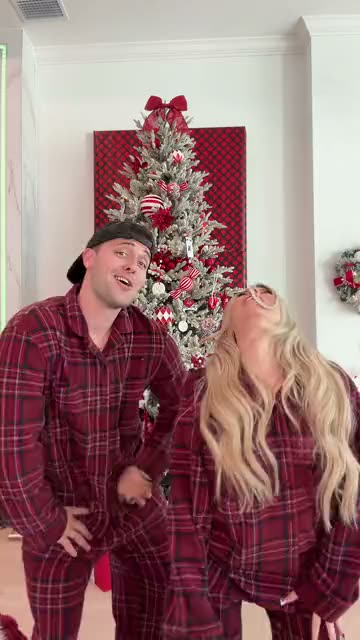 Winter Wonderland Dance15 秒 · 100 點 · Seedance 2.5 · 480p
Upload one photo to the AI dance generator and get a short AI dance video of you doing a viral dance, step for step.
Updated · By the Remix Motion team
What our AI dance generator does
Most photo-to-video tools guess the movement from a text prompt, so the dance comes out vague and off the beat. Our AI dance generator works the other way round: every template carries the moves of a real viral dance, and your photo only decides who is dancing.
Behind each template is a private motion reference, a silent grey depth video that holds the timing, steps and camera of the trend but no face and no sound. The model follows that reference and draws you, your outfit and your hair into each frame. The result is a short vertical AI dance video in the same rhythm as the original.
Dance is one part of our AI video templates, which also cover duo skits, party scenes and pet videos. Christmas dances have their own page, the AI Christmas Dance. If you came here from a trend tool such as Genjutsu, our Genjutsu AI guide explains how the two approaches differ.
Viral dances you can turn into an AI dance video
The generator at the top of this page lists every dance template we offer right now, with its length, the number of photos it needs and its price. We add a new template when a trend takes off on TikTok or Instagram, so the list changes every few weeks.
Each AI dance video keeps its natural length, from a six-second shoulder move to a fifteen-second street freestyle, because cutting a dance short ruins the hook. Some templates are made for two people: those templates ask for one photo per dancer.
- Solo: one photo, you do the whole routine.
- Duo: two photos, each person keeps their own side of the frame.
- Vertical 9:16 video, ready for TikTok, Reels and Shorts.
Which photo makes the best AI dance video
The AI dance generator can only animate what it sees. A photo that shows your whole body gives the AI your legs, shoes and posture to work with; a close-up selfie forces it to invent everything below your shoulders.
- Full body or knee-up, standing, facing the camera.
- Both arms visible, not crossed or behind your back.
- Even light and a plain background.
- Only you in the frame: crop out friends and strangers.
- No sunglasses, masks or hats that hide your face.
Is there a free AI dance generator?
Not here, and we would rather say so up front. Every video uses a paid AI model, so Remix Motion has no free tier and no trial credits. An AI dance video costs 75 to 100 credits, and the exact price shows on the Generate button before you press it. Credit packs start at $9.90 for 100 credits and never expire; see pricing for every pack.
If an AI dance video fails, the credits held for it go back to your balance automatically. You never pay for a video you did not get.
AI dance generator vs. a prompt-based video tool
Both turn a photo into a video, but they suit different jobs. Use the AI dance generator when you want a known viral dance; use a prompt tool when you want to invent a scene from scratch.
| Remix Motion AI dance templates | Prompt-based video tools | |
|---|---|---|
| What you give it | One photo | A photo plus a written prompt |
| Where the moves come from | A real viral dance | The model’s guess from your words |
| Timing | Matches the trend | Varies from try to try |
| Price | Shown before you generate | Often shown after |
| Failed video | Credits back automatically | Depends on the tool |
How to use the AI dance generator in 3 steps
Pick a dance
Choose a template in the AI dance generator above. Each card shows the length, the number of photos and the price.
Upload your photo
Add a full-body or knee-up JPG, PNG or WebP photo of yourself, or of an adult who agreed to be in the video.
Generate and post
Press Generate. It usually needs a few minutes; download the AI dance video and post it with the trend’s sound.
Tips for an AI dance video people watch to the end
Add the original sound
Use the trend’s song inside TikTok or Instagram when you post. The app then groups your AI dance video with everyone else doing it.
Match the outfit to the dance
Street dances look best in casual clothes, party dances in something dressier. The AI keeps the outfit from your photo.
Try a second photo
If one AI dance video looks stiff, a photo with a more relaxed stance often gives smoother moves.
Say it is AI
Turn on the platform’s AI-generated label. Viewers enjoy the joke more when nobody feels tricked.
Frequently asked questions
Is there a free AI dance generator?
Remix Motion has no free tier: every video uses a paid AI model. An AI dance video costs 75 to 100 credits, shown before you generate, and credit packs start at $9.90 for 100 credits. Failed videos are refunded automatically.
What is the AI that makes you dance?
It is an AI dance generator: a video model that takes a photo of a person and a set of dance moves and draws that person doing the moves. Ours uses Seedance with a motion reference taken from each viral dance.
How do I create a video of me dancing with AI?
Pick a template in the AI dance generator on this page, upload a full-body photo of yourself and press Generate. You get a short vertical AI dance video of yourself, ready to download.
How do I make my photo dance with AI?
Choose a viral dance above, upload one full-body photo and press Generate. The photo dance AI draws the person in your photo doing every step of the trend, and the video is ready to download a few minutes later. No app to install and no prompt to write.
What is the viral dance AI everyone is using?
Most viral AI dance videos come from apps that animate a photo with a dance template. Remix Motion adds a template for each dance trending right now, so you can join a trend while it is still climbing.
Which app makes an AI dance video from a photo?
Any AI dance generator that animates a photo works, and most are phone apps. Remix Motion runs in the browser: upload one photo, pick a viral dance and download the AI dance video a few minutes later, with nothing to install.
Does the AI dance video have music?
The AI dance video comes with generated sound. For the trend’s actual song, add it in TikTok or Instagram when you post; that also helps the app show your video to people following the trend.
Can two people dance together?
Yes, on duo templates. They ask for one photo per dancer, and both people must be adults who agreed to be in the video.
Can I make a photo of a celebrity dance?
No. Use only photos of yourself or of adults who agreed. Photos of celebrities and other public figures are not allowed under our Acceptable Use Policy.
Keep exploring
Make your video now
Pick a template above and upload a photo of yourself.