Chandelier Party AI Video Template: Own the Room Tonight
One photo of you, leading a private party under crystal chandeliers.
Updated
Select template
Settings
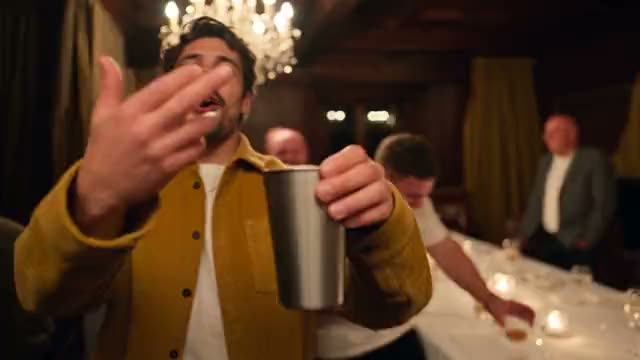 Chandelier Party15s · 100 credits · Seedance 2.5 · 480p
Made with this template
What is the Chandelier Party AI video template?
The Chandelier Party AI video template is filmed in 16:9 like a music video. The camera finds you in the middle of a packed private room, chandeliers glowing above, a silver cup raised high. You bounce to the beat and the crowd bounces with you.
Halfway through you turn and point at your friends, then raise a hand to your brow and scan the room like you are looking for someone. The sound is original party music with crowd noise, so the video is safe to post as it is.
Where the Chandelier Party trend comes from
The template recreates the Burning Bridges party moment. Near the end of the music video for Drake’s May 2026 single there is a private-room party under candle-bulb chandeliers: he walks up to the camera with a silver cup, points at the lens, holds a flat hand over his eyes to scan the room, then raises the cup while the crowd laughs. The gesture went mainstream on July 2, 2026, when Drake was shown on the big screen doing it at a World Cup match in Toronto, and Cristiano Ronaldo copied it a few days later. AI remakes began in late September, and by early October the scene was all over TikTok, Reels and X, with US searches peaking around October 10. No single creator is credited with starting the trend. The joke is the contrast: the most “I made it” party you can picture, with the least likely guest in the middle. Because the gesture needs no words, it works with anyone, and the Chandelier Party AI video template puts you in the middle of the room.
Why the Chandelier Party trend works
The Chandelier Party AI video template works because it is pure main-character energy. A packed room, glowing chandeliers and a raised silver cup say celebration before a single word. The point toward your friends invites tagging, and the hand-over-the-brow scan is a gesture people copy in their own videos. With you in the lead role, it is the night out everyone wishes they had filmed.
Key features of the Chandelier Party AI video template
- No prompt: the Chandelier Party scene, camera and timing are set.
- Chandelier Party videos run 15 seconds, like the original.
- A wide 16:9 Chandelier Party video with sound.
- No visible watermark on your Chandelier Party video.
Ideas for your Chandelier Party video
- Caption it with your party nickname, like a host making an entrance.
- Post it before a birthday or a night out to hype the guests.
- Tag the friends you would point at in the room.
Best photos for the Chandelier Party AI video template
The Chandelier Party template asks for 1 photo: you (leads the party).
- A waist-up photo with your arms visible gives the best cup raise and point.
- Face the camera with a clear view of your face; the room is dim, so a bright photo helps.
- Dress up a little: the AI keeps your outfit, and the room is fancy.
Chandelier Party AI video template vs filming it yourself
| Chandelier Party template | Filming it yourself | |
|---|---|---|
| You need | One photo | A camera, a location and a helper |
| Time | A few minutes | Hours of filming and editing |
| Timing | Matches the Chandelier Party trend | Depends on your takes |
| If it fails | Credits back | Film it again |
How much the Chandelier Party AI video template costs
One Chandelier Party video costs 100 credits before you generate. Credit packs start at $9.90 for 100 credits and never expire, with no subscription; see pricing.
How to make your Chandelier Party video
Check the Chandelier Party template
The Chandelier Party AI video template is already selected in the generator above, at 100 credits per video.
Upload your photo
Use clear photos of yourself, of adults who agreed to be in your Chandelier Party video, or of your pet where the template allows it.
Generate and post
Press Generate and download your Chandelier Party video when it is ready, usually in a few minutes. Add the Chandelier Party trend’s sound when you post.
Posting tips for your Chandelier Party video
Post while it trends
Post your Chandelier Party video while people still search for it.
Use the trend’s sound
The app then shows your Chandelier Party video next to the others.
Tag who you made it with
A Chandelier Party video travels further when they share it too.
Label it as AI
Turn on the AI label for your Chandelier Party video.
More like this
- New9s
Party Guy
1 photo80 credits
- You
- Trending15s
Street Freestyle
1 photo100 credits
- You
- Pet
- Trending15s
Love Story
2 photos100 credits
- You
- 2 people
- 15s
Pet Reunion
2 photos100 credits
- Pet
- 2 people
Frequently asked questions
Is the Chandelier Party AI video template free?
No. Each Chandelier Party video costs 100 credits before you generate, and a failed Chandelier Party video gives its credits back.
Can I post it on TikTok as it is?
Yes. Your Chandelier Party video has no visible watermark and its own sound. Add the trending sound in the app if you want the original track.
Why is this video horizontal?
The original scene is widescreen, so the Chandelier Party template is 16:9. It still posts fine on TikTok and Reels with bars, or crop it in the app.
Can two people host together?
Not in this template: it makes one host per video. The crowd around you is newly generated.
What does the hand over the eyes mean?
It is a playful “where is she?”: a flat hand over the eyes while scanning the room. The Chandelier Party template keeps that look-around before the cup goes up.
Where does the chandelier scene come from?
From a private-room party near the end of a May 2026 music video, the moment people copy at about 2:55. Your Chandelier Party video recreates the room, not the original footage.
Can I use a photo of a celebrity in the Chandelier Party video?
No. Use only photos of yourself or of adults who agreed to be in the Chandelier Party video. Photos of celebrities and other public figures are not allowed under our Acceptable Use Policy.
Keep exploring
Make your video now
Pick a template above and upload a photo of yourself.