Gangnam Style AI Video Template: Three Friends, One Night
Three photos, three friends, one city street at night: a group selfie, then everyone gets a solo.
Updated
Select template
Settings
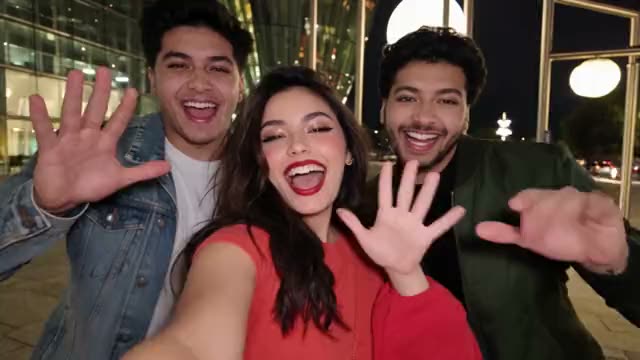 Gangnam Style19s · 100 credits · Seedance 2.5 · 480p
Made with this template
What is the Gangnam Style AI video template?
0 to 1.6 seconds: the Gangnam Style AI video template opens on a group selfie. The friend in the middle holds the phone, the two on the sides wave at the lens, and all three are already laughing and singing.
1.6 to 4.5 seconds: the middle friend takes a solo close-up, then the camera whips sideways. 4.5 to 7.7 seconds: the left friend sings at waist height, one hand on the chest and the other on the hip.
7.7 to 11.7 seconds: the right friend walks away from the camera, turns around and leans in close, tapping a temple. 11.7 to 15.6 seconds: the middle friend is back for a second solo, pointing at the lens and winking.
15.6 to 19 seconds: the other two squeeze back into frame for a last group shot, shouting and waving on every beat. Every move and cut sits on the trend song's beat, so the sound lines up when you add it in TikTok.
Where the Gangnam Style trend comes from
The template recreates the Gangnam Style AI trend that took over TikTok in October 2026. It borrows the energy of PSY's 2012 hit, but not the horse dance: three friends film a group selfie on a city street at night, then the phone swings from face to face and each one sings a few bars alone before everyone crowds back in. The first clips appeared at the end of September; a three-friend street video from Seoul passed 18 million views in early October, and copies from other cities and AI remakes followed within days. Google searches for Gangnam Style AI started climbing around October 22, led by India and Pakistan. The fun is the hand-off: three very different faces taking turns as the star. The Gangnam Style AI video template keeps that structure and puts you and two friends in it, with an original scene instead of the song or the original footage.
Why the Gangnam Style trend works
The Gangnam Style AI video template works because every friend gets a moment. The group selfie says this is us, the solos let each personality show, and the whip pans keep the pace high, so 19 seconds of Gangnam Style never drag. It is made for tagging: post it and the other two will want to share it too.
Key features of the Gangnam Style AI video template
- No prompt: the Gangnam Style scene, camera and timing are set.
- Gangnam Style videos run 19 seconds, like the original.
- A wide 16:9 Gangnam Style video; add the trend’s sound when you post.
- No visible watermark on your Gangnam Style video.
Ideas for your Gangnam Style video
- Post it with your group chat name as the caption and tag the other two.
- Make a Gangnam Style AI video for a birthday, a trip or the last night of a holiday together.
- Add the trending Gangnam Style sound in TikTok; the cuts land on the beat.
Best photos for the Gangnam Style AI video template
The Gangnam Style template asks for 3 photos: friend 1 (on the left) and friend 2 (in the middle) and friend 3 (on the right).
- Use three photos, one person each: yourself and adults who agreed to be in the video.
- Chest-up photos facing the camera work best, because the solos are close-ups.
- Upload left to right: the second photo is the friend in the middle, who holds the phone and gets two solos.
- Bright, sharp photos help, since the Gangnam Style scene is a street at night.
- Everyone keeps the outfit from their own photo, so dress for a night out.
Gangnam Style AI video template vs filming it yourself
| Gangnam Style template | Filming it yourself | |
|---|---|---|
| You need | Two photos | A camera, a location and a helper |
| Time | A few minutes | Hours of filming and editing |
| Timing | Matches the Gangnam Style trend | Depends on your takes |
| If it fails | Credits back | Film it again |
How much the Gangnam Style AI video template costs
One Gangnam Style video costs 100 credits before you generate. Credit packs start at $9.90 for 100 credits and never expire, with no subscription; see pricing.
How to make your Gangnam Style video
Check the Gangnam Style template
The Gangnam Style AI video template is already selected in the generator above, at 100 credits per video.
Upload both photos
Use clear photos of yourself, of adults who agreed to be in your Gangnam Style video, or of your pet where the template allows it.
Generate and post
Press Generate and download your Gangnam Style video when it is ready, usually in a few minutes. Add the Gangnam Style trend’s sound when you post.
Posting tips for your Gangnam Style video
Post while it trends
Post your Gangnam Style video while people still search for it.
Use the trend’s sound
The app then shows your Gangnam Style video next to the others.
Tag who you made it with
A Gangnam Style video travels further when they share it too.
Label it as AI
Turn on the AI label for your Gangnam Style video.
More like this
- Trending15s
Zombie Love Story
2 photos100 credits
- You
- 2 people
- 15s
Zombie Pet
2 photos100 credits
- Pet
- 2 people
- New9s
BbY WOW Guy
1 photo80 credits
- You
 15s
15sBurning Bridges
1 photo100 credits
- You
Frequently asked questions
Is the Gangnam Style AI video template free?
No. Each Gangnam Style video costs 100 credits before you generate, and a failed Gangnam Style video gives its credits back.
Do I need three photos?
Yes. The Gangnam Style template takes exactly three photos, one person each, in the order you stand: left, middle, right. One group photo will not work.
Does the video use the Gangnam Style song?
No. Your Gangnam Style AI video has no music: add the trending sound in TikTok or Reels when you post. The cuts follow the song's tempo, so it lines up.
Why is the video horizontal?
The trend clips are widescreen selfies, so the Gangnam Style AI video template is 16:9. It still posts on TikTok and Reels, or crop it in the app.
Is this the official Gangnam Style video?
No. Remix Motion is an independent tool, not affiliated with PSY, his labels or TikTok. It recreates the trend's look with an original scene.
Can I use a photo of a celebrity in the Gangnam Style video?
No. Use only photos of yourself or of adults who agreed to be in the Gangnam Style video. Photos of celebrities and other public figures are not allowed under our Acceptable Use Policy.
Keep exploring
Make your video now
Pick a template above and upload a photo of yourself.