AI Pet Video: Put Your Dog or Cat in a Viral Trend
Select template
Settings
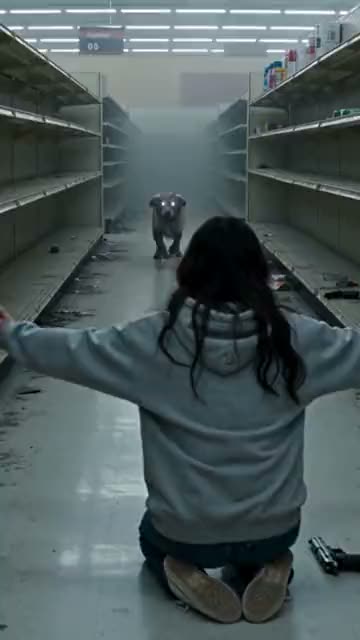 Zombie Pet15s · 100 credits · Seedance 2.5 · 480p
Made with this template
Upload one photo of your dog or cat and get an AI pet video of a trend everyone is posting. Some templates put you in the video with your pet.
Updated
AI pet video templates
Every template that takes a photo of your pet, newest first. Open one to see its example, length and price.
- Trending15s
iPhone Kupi Dance
1 photo9:16
- You
- Pet
- Trending12s
Crazy Frog
2 photos9:16
- You
- Pet
- 2 people
- Trending14s
Window Peeper Filter
1 photo9:16
- You
- Pet
- 13s
ChatGPT Millionaire
1 photo9:16
- You
- Pet
- Trending15s
Bulin 47
1 photo9:16
- You
- Pet
- 15s
Zombie Pet
2 photos9:16
- Pet
- 2 people
What is an AI pet video?
AI pet videos are everywhere on TikTok and Reels: cats doing the latest dance, dogs acting out a meme, pets dropped into a scene everyone is copying. Each one starts from an ordinary pet photo. An AI video model animates the pet inside a scene that someone made popular first.
Most tools ask you to write a prompt and hope the pet video comes out right. Here every AI pet video template already holds the scene, the camera and the timing of a real trend. Your pet photo only decides who stars in it, so the result looks like the trend people know.
Which trends take a pet photo
The generator at the top of this page offers only the AI pet video templates, and the gallery above shows each one with its length and price. We add a pet template whenever a trend works with animals, so the list grows with the trends.
- One photo, your pet stars: ChatGPT Millionaire, iPhone Kupi Dance, Window Peeper Filter and Bulin 47.
- Two photos, you and your pet in one AI pet video: Crazy Frog and Zombie Pet.
Make an AI dog video
Dogs make great AI pet video stars because their faces read well on a small screen. For an AI dog video, use a photo where your dog looks at the camera with its whole head in view. Long ears and fluffy coats come out best in soft daylight.
Big dogs and small dogs both work. If your dog has a distinctive mark, a patch over one eye or a white chest, make sure the photo shows it: the AI dog video keeps what it can see.
Make an AI cat video
An AI cat video lives on the cat’s expression, so the eyes matter most. Pick a photo where your cat is awake, facing the camera and not squinting. A cat sitting upright gives the AI more to animate than a cat curled into a ball.
Dark cats need more light. A black cat photographed at night often turns into a shadow with eyes; the same cat by a window in daylight gives a much clearer AI cat video.
Which photo makes the best pet video
The AI can only animate what the pet photo shows. One sharp photo beats a cute but blurry one.
- One pet per photo: crop out other animals and people.
- Face visible, eyes open, looking at or near the camera.
- Even light, no heavy filters or stickers.
- The pet fills most of the frame.
- For two-photo templates, a separate photo of you, facing the camera.
Is there a free AI pet video generator?
Not here. Every pet video uses a paid AI model, so Remix Motion has no free tier and no trial credits. An AI pet video costs 100 credits, and the exact price shows on the Generate button before you press it. Credit packs start at $9.90 for 100 credits and never expire; see pricing for every pack.
If a pet video fails, the credits held for it go back to your balance automatically.
How to make an AI pet video in 3 steps
Pick a pet template
Choose one of the AI pet video templates above. Each card shows the length, the number of photos and the price.
Upload your pet photo
Add a sharp JPG, PNG or WebP photo of your dog or cat. Two-photo templates also ask for a photo of you.
Generate and post
Press Generate. Your AI pet video is usually ready in a few minutes; download it and post it with the trend’s sound.
Tips for a pet video people share
Post while the trend is hot
Pet versions of a trend spread fastest in its first days, while people still search for it.
Name your pet in the caption
Viewers love a name. It also helps friends and family find the pet video.
Add the trend’s sound
Pick the trending sound in TikTok or Instagram, so the app shows your pet next to everyone else doing it.
Say it is AI
Turn on the platform’s AI-generated label. Pet fans enjoy the joke more when nobody feels tricked.
Frequently asked questions
Is there a free AI pet video generator?
Remix Motion has no free tier: every video uses a paid AI model. An AI pet video costs 100 credits, shown before you generate, and credit packs start at $9.90 for 100 credits. Failed videos are refunded automatically.
Can I make an AI video of my dog?
Yes. Pick an AI pet video template on this page, upload a clear photo of your dog facing the camera and press Generate. You get a short AI dog video of the trend, ready to download.
Can I make an AI cat video?
Yes, the same way: one awake, well-lit photo of your cat in any AI pet video template. Cats sitting upright and looking at the camera come out best.
Can my pet and I be in the same video?
Yes, on the two-photo templates. They ask for one photo of your pet and one of you, and you appear together in the AI pet video.
Which pets work best?
Dogs and cats work best. Other animals can work when the photo shows one animal clearly, facing the camera.
Does my pet video have sound?
Most templates come with sound generated for the video; a few are silent on purpose, and their pages say so. The trend’s original song is never in the video, so add it in TikTok or Instagram when you post.
Keep exploring
Make your video now
Pick a template above and upload a photo of yourself.