How to Make an AI Christmas Card Video
Select template
Settings
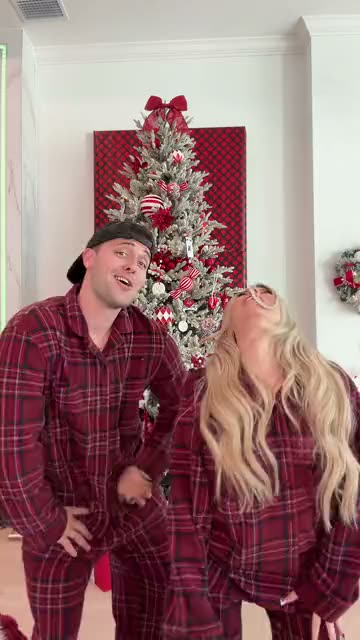 Winter Wonderland Dance15s · 100 credits · Seedance 2.5 · 480p
A Christmas card people actually watch twice: you in a holiday trend, sent in a message.
Updated · By the Remix Motion team
Templates for a Christmas card
Pick the holiday scene that fits the people you send it to: Dancing With Santa, Snowman Dance, Jingle Bell Brazil Dance, Christmas Downstairs, Last Christmas x Phat Dance, Christmas Pajama Dance and Winter Wonderland Dance.
Where the greeting goes
The video has no text on it, so it works for anyone. Write your greeting in the message you send it with: “Merry Christmas from the two of us”, a joke, a family update. One video, a different message for colleagues, friends and family.
Who to send it to
- Friends far away, instead of a card that arrives in January.
- Your team chat, as a light end-of-year hello.
- Grandparents, played on their tablet or TV.
- Your followers, as a holiday post.
What it costs
A Christmas card video costs 75 to 100 credits, and you can send it to as many people as you like. There is no free tier; credit packs start at $9.90 for 100 credits and never expire. See pricing. A failed video is refunded automatically.
Make your Christmas card video in 3 steps
Pick a holiday scene
Choose a Christmas template above.
Upload your photo
A clear, front-facing photo; add a second one for a two-person scene.
Generate and send
Download the video and send it with your own greeting.
Tips
Send it early
Videos sent in mid-December get watched; the ones on the 25th get lost in the flood.
One video, many messages
Change the greeting, not the video, for each group.
Festive photo
A red jumper or a Santa hat in your photo carries into the video.
Say it is AI
A quick “made with AI” in the message avoids confusion.
Frequently asked questions
How do I make an AI Christmas card video?
Pick a Christmas template, upload your photo and press Generate. Download the video and send it with your greeting.
Can I add my own message to the video?
The video carries no text; write your greeting in the message or post you send it with, or add text in your phone’s editor or TikTok before posting.
Which Christmas scenes are there?
Today: Dancing With Santa, Snowman Dance, Jingle Bell Brazil Dance, Christmas Downstairs, Last Christmas x Phat Dance, Christmas Pajama Dance and Winter Wonderland Dance.
How much does it cost?
75 to 100 credits per video, shown before you generate. Send it to as many people as you like.
Keep exploring
Make your video now
Pick a template above and upload a photo of yourself.